
From Upload to IPFS: How ratum Signs, Seals, and Archives Documents in Encrypted Form
When you have a contract signed online, you let it out of your hands. It then sits somewhere on a provider’s server, and most of the time you never find out who can read it there, how long it stays, or what actually happens when it is deleted. For an SME that has employment contracts, quotes, and mandates signed, this is no trivial matter.
ratum is our answer to that: an eSignature solution for small and medium-sized enterprises, fairly priced, with data held in the EU and a long-term archive on IPFS. In this article I show how it works technically: how a document is uploaded, checked, signed, sealed, and finally archived in encrypted form. I describe the current state of affairs and also point out the places where ratum deliberately does not promise everything.
Try ratum directly: ratum.ch
The Problem: Trust Without Transparency
With most e-signing services, it remains unclear what happens after you click “Send”. There are three reasons for this that bothered us:
- Pricing models that do not match usage patterns. If you rarely have things signed, you still pay a subscription.
- Unclear data storage. Where the document is held and who can decrypt it is rarely explained in an understandable way in the Documentation.
- An archive that belongs to the provider. If the provider disappears or changes its terms, access to old contracts depends entirely on them.
ratum counters this with a fair pricing model, operations based in the EU, and an archive in which the provider stores only ciphertext. We dedicate the rest of this article to the question of how that is built.
The Building Blocks and the Most Important Trust Boundary
ratum is a classic web application: a React single-page app in the browser, a FastAPI interface, a Celery worker for the heavy lifting, PostgreSQL for metadata, Redis as a queue, and Cloudflare R2 as temporary storage. The archive is hosted at Filebase, which pins the files to IPFS. Login is handled by a central identity provider, and emails are sent by our project SubscribeFlow.
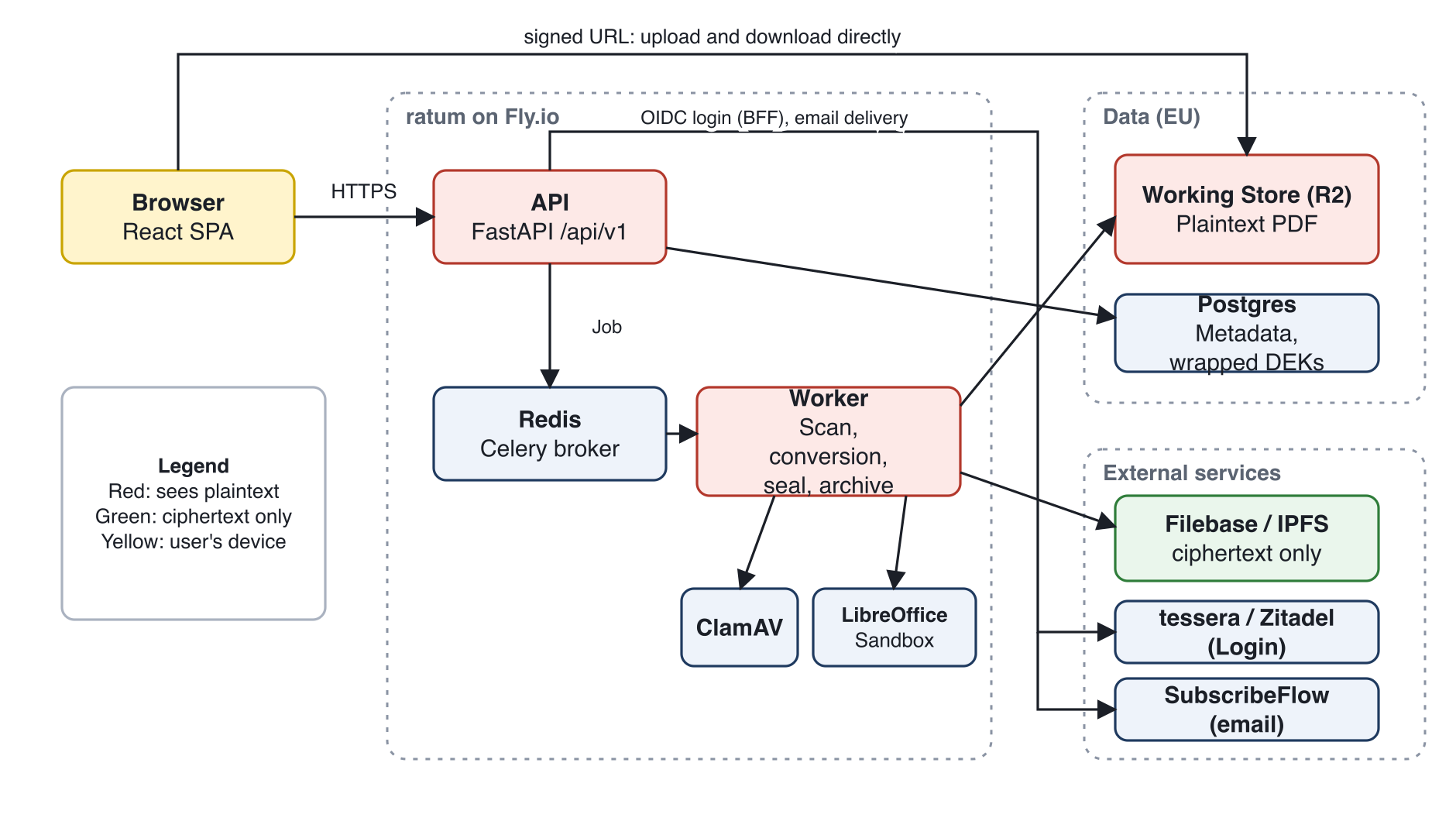
More important than the list of components is the colour coding in the diagram. Red marks what sees plaintext: the API, the worker, and the temporary storage. Green marks what sees only ciphertext: Filebase and the public IPFS network. The decisive trust boundary therefore runs between ratum and the archive. Whatever arrives there is encrypted before it leaves our system.
A Document’s Journey in Seven Stages
- Upload to temporary storage, status
DRAFT. - Virus scan; for DOCX files, additionally conversion to PDF.
- The sender specifies signers and fields and dispatches the document.
- The signers sign in sequence. After the final signature, the document is
SIGNED. - The worker stamps the signatures into the PDF and seals it (PAdES).
- The worker encrypts the sealed PDF and archives it at Filebase; status
ARCHIVED. - After a successful read-back, the plaintext copies are deleted.
Stages 1 to 3 are unspectacular but security-relevant. Stages 5 to 7 are the core of this article.
Upload, Virus Scan, and Conversion
The browser does not upload the file via our API but directly to storage, via a time-limited, signed URL. The API sees no file bytes during the upload. Only afterwards does the browser confirm, and the API checks via a HEAD request whether the object exists and does not exceed the permitted size.
The worker then scans the file with ClamAV. The scan is fail-closed: a document that could not be scanned is never considered clean. If a threat is found, the file is deleted and the document remains only as an entry with the status INFECTED.
LibreOffice converts DOCX files to PDF in a hardened manner: without network access, with memory and CPU limits, and in a dedicated process environment that is cleaned up after the job. An Office parser processing external documents is a classic attack surface; the sandbox limits the damage.
Signature and Seal
The signing process runs sequentially. Only the first signer is initially active and receives an invitation containing a unique token. Only the hash of that token is stored in the database. Each signature generates an audit entry with a timestamp, IP address, and user agent. Only then is the next signer invited.
As soon as the last person has signed, the worker takes over:
- It stamps signature images and the date at the designated positions.
- It adds a footer with a verification code and QR code.
- It seals the PDF with an invisible PAdES seal.
- It computes a SHA-256 hash over the sealed PDF and records it in the audit trail.
The seal proves that the PDF has not been altered since sealing and that it originates from ratum. Even a single appended byte will invalidate it. It is a platform seal, not a qualified electronic signature (QES). We state this clearly because the distinction matters legally. Via a public verification page, any person can upload a PDF and check it against the stored hash and the seal.
The Encrypted Archive
Now to the part that gave us the most headaches: how do you archive contracts long-term on a public, decentralised network without them being readable there?
Envelope Encryption in Three Terms
We use a two-tier key hierarchy:
- DEK (Data Encryption Key): a fresh, random 256-bit key per document. It encrypts exactly one thing, using AES-256-GCM.
- KEK (Key Encryption Key): a single key for the platform. It encrypts only the DEKs (“wrapping”), never the data.
- AAD (Additional Authenticated Data): a context — here the document ID — that is bound into the encryption.
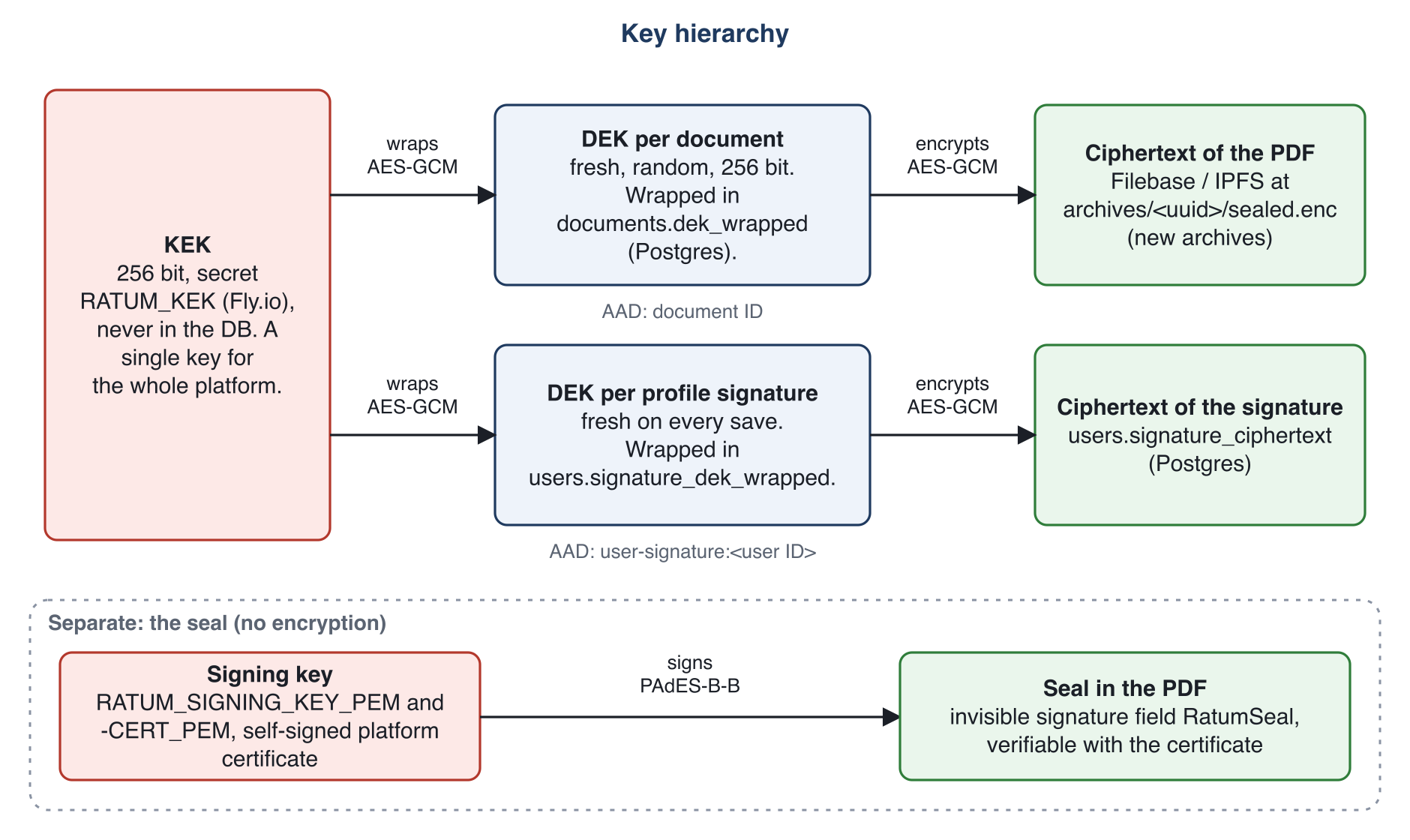
Data and keys are stored in separate locations: the ciphertext at Filebase, the wrapped DEK in our database, and the KEK exclusively as a process secret. Anyone who possesses only one of these can read nothing. The AAD additionally ensures that ciphertexts cannot be swapped between documents unnoticed, because the authentication tag would then no longer match.
The Archiving Process Step by Step
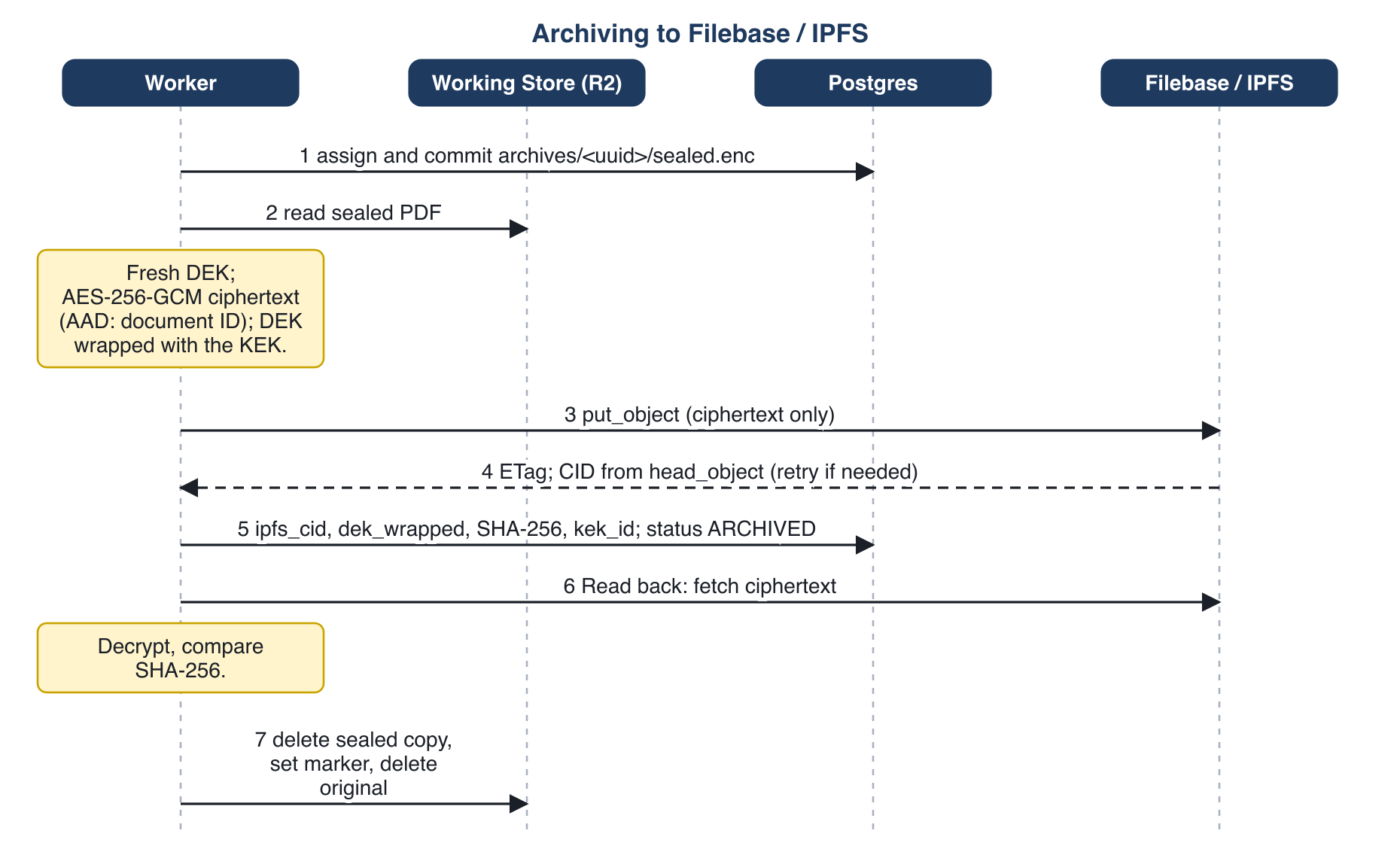
The process follows a simple rule: nothing is deleted until the opposite has been proven.
- The worker assigns a pseudonymous object key (
archives/<random uuid>/sealed.enc). It contains neither a user ID nor a document ID. - It encrypts the sealed PDF with a fresh DEK and wraps that DEK with the KEK.
- It uploads only the ciphertext to Filebase. Filebase pins it to IPFS and assigns the content identifier (CID).
- Before accepting the CID, it checks the ETag to ensure it does not accidentally adopt the CID from a parallel run.
- It records the CID, wrapped DEK, hash, and status in a single transaction.
- Finally, it reads the archive back, decrypts it, and compares the SHA-256. Only when this matches does it delete the plaintext copies in temporary storage.
If the read-back fails, the original and the sealed copy are retained. It is better to keep one document too many than to lose one.
On later retrieval, the process runs in reverse: fetch the ciphertext, unwrap the DEK, decrypt, verify the hash. If anything differs, the system reports it loudly rather than attempting a silent repair.
Deleting in a Network That Does Not Forget
IPFS is content-addressed and decentralised. What has once entered the network cannot reliably be recalled. For the right to erasure (GDPR Art. 17) we therefore rely on crypto shredding: when a document is deleted, the wrapped DEK is removed from the database. Without it, the ciphertext is permanently unreadable, even if it still exists somewhere in the network.
This is an honest but not an absolute guarantee. Database backups may still contain the wrapped DEK, and whether the content disappears from the IPFS network cannot be guaranteed at Filebase. A backup retention policy is planned as the next step but has not yet been implemented.
What ratum Does Not Promise
A security article that lists only strengths is advertising. Here, therefore, are the limitations, as we document them internally:
- No zero-knowledge, no end-to-end encryption. The server must work with plaintext before finalisation: scanning, converting, stamping, and sealing cannot be done with encrypted bytes. ratum sees the plaintext up until archiving and again at every retrieval in the API’s working memory.
- Anyone who has both the KEK and the database can read archived documents. The KEK is a single key for the platform. An operator with access to both is not excluded in the current model.
- Temporary storage is not encrypted on the application side. The protection there relies on access controls, short-lived URLs, and the provider’s own encryption.
- The seal is not a QES.
- Metadata such as the filename, signer email addresses, and the audit trail are stored in plaintext in the database.
A proposal for how we could move this boundary is on record as an architectural decision: an optional customer key mode, in which the DEK would be wrapped not with the KEK but with a key belonging to the customer. The status is “proposed”; nothing has been built. It would also have drawbacks: if the key were lost, we would be unable to recover anything.
That is why we deliberately do not speak of “zero-knowledge” externally.
What Comes Next
The limitations above are not a permanent state of affairs, but neither are they a promise with a date attached. These are the directions we are pursuing or evaluating:
- Greater trust in the seal. Today the seal is a platform seal. We are exploring how far we can elevate it with a certificate from a recognised certification authority, a qualified timestamp, and PAdES-B-LT, and what the public verification page should display as a result. The underlying question of where ratum positions itself with regard to the qualified signature has not yet been decided.
- A hardened archive. This includes rotating the KEK with re-wrapping of the archived DEKs and a documented, audited retention policy for database backups.
- Keys closer to the customer. Alongside the customer key mode, we are evaluating a native desktop app for Windows and macOS. It could hold keys in the device’s key store and alleviate the problem that in a browser context the server itself delivers the code that is supposed to perform the encryption. Even so, ratum would not be zero-knowledge: signers continue to work in the browser and must be able to read the document, and scanning and sealing require plaintext. It would be a step towards moving keys away from the operator, not a replacement for the limitations described above.
Conclusion
A document’s journey through ratum consists of many small, individually verifiable steps. The protective effect does not arise from any single mechanism but from the interplay of all of them: direct upload, fail-closed scan, seal over the entire file, separate storage of ciphertext and key, read-back before deletion, and crypto shredding in place of the illusion that a decentralised network can be emptied.
Why we built ratum and what it offers in Early Access is described in the launch article.
Try ratum: ratum.ch – fair e-signing from the EU, with an encrypted IPFS archive.